
2026-08-12
Share


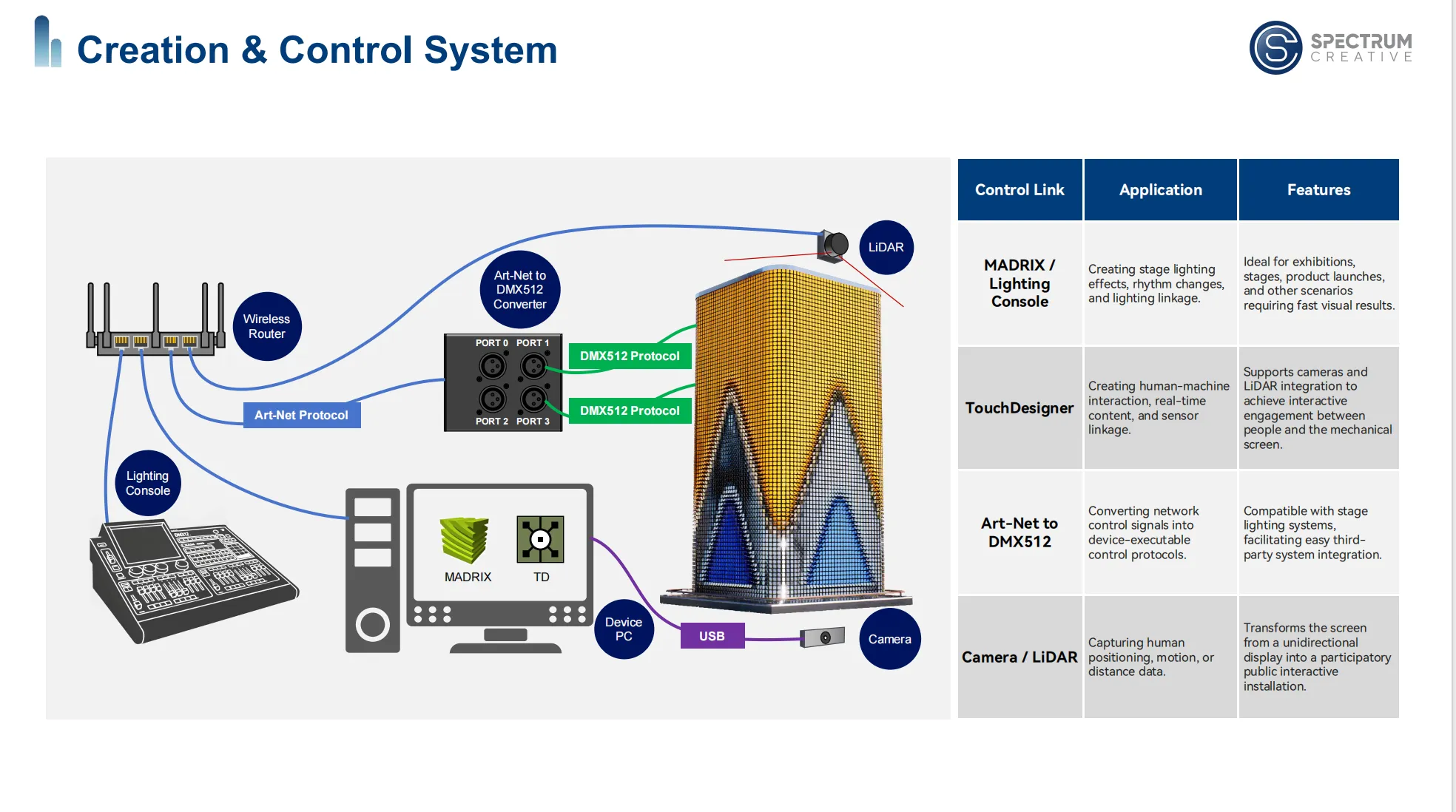
Mlxos Series interactive system integration is a complete signal-control-execution imaging loop that connects the to control platforms like TouchDesigner and MADRIX via Art-Net/DMX512 communication protocols, combined with external signal sources such as cameras—transforming the from a "one-way display device" into a "participatory, feedback-driven public interactive interface."
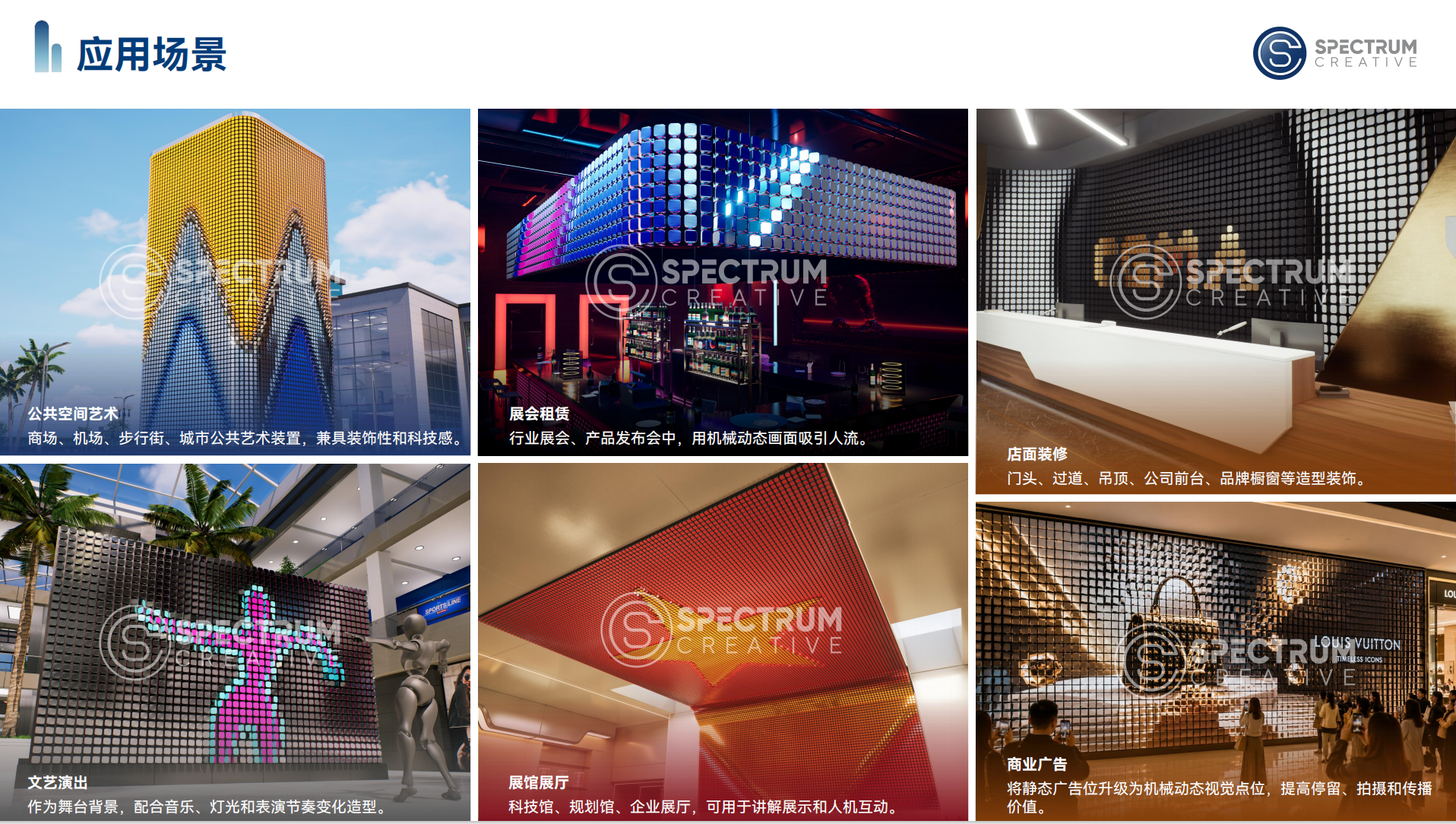
1. From "Viewing" to "Playing": Interactivity as the Core Path to Experience Upgrade
2. Control System Architecture: Control Software → Signal Conversion → Mechanical Execution
3. Three Major Control Scenarios in Detail
l MADRIX / Lighting Consoles: Stage Lighting Effects, Rhythm Synchronization
l TouchDesigner: Human-Computer Interaction, Real-Time Content, Sensor Integration
l Art-Net to DMX512: Third-Party System Integration and Stage Cascading
1. Signal Input and Sensors: How Cameras Capture Human Motion
2. Interactive Content Creation Guide: Key Steps from Concept to Deployment
3. Good Interaction vs. Bad Interaction: Design Principles and Common Pitfalls
4. FAQ
5. Further Reading
The core value of traditional s lies in "display"—presenting preset panel transitions through mechanical flipping. But the value of the Mlxos Series extends far beyond that. When the is connected to external signal sources and real-time control systems, it is no longer a passive playback device, but an interactive interface capable of responding to external inputs, changing in real time, and engaging with audiences.
According to a 2025 report by the International Interactive Art and Technology Society (ITS), interactive dynamic installations achieve 3.8 times longer audience engagement and 6.2 times higher organic social media sharing rates compared to static installations. This means that adding interactivity to the is not just a technological upgrade—it is a leap in commercial value.
All Mlxos Series models support interactive integration. Whether you choose the high-density Mlxos 100, the cost-effective Mlxos 168, or the lighting/LED-enhanced 138L/138P, all can be connected to interactive systems through unified control protocols.
A complete Mlxos Series interactive system consists of the following three layers:
text
[Control Layer] ──> [Transport Layer] ──> [Execution Layer]
│ │ │
TouchDesigner Art-Net Mlxos Motor Drive
MADRIX to DMX512 Real-time flip
Camera signal response
integration
Layer Responsibilities:
Layer | Function | Key Devices/Protocols |
Control Layer | Receive external signals, generate flip commands | TouchDesigner, MADRIX, camera |
Transport Layer | Convert Ethernet signals to device execution protocols | Art-Net → DMX512 |
Execution Layer | Receive commands and drive mechanical unit flipping | Mlxos servo motor drive system |
In this chain, the response speed from signal input to mechanical action directly impacts the smoothness of the interactive experience. The Mlxos Series' full-chain optimization ensures immediacy between audience action and screen feedback.
MADRIX is an industry-leading LED pixel mapping and control software widely used in stage lighting, architectural illumination, and large-scale LED installations. When the Mlxos Series is integrated into a MADRIX control environment:
l Application Scenarios: Trade shows, stages, product launches—scenarios requiring rapid visual output
l Core Capabilities: Direct control of rhythm and color changes via DMX512/Art-Net protocols, synchronized with stage lighting systems
l Advantages: Low learning curve, quick results, seamless integration with existing lighting consoles
l Typical Use: flipping to the beat at music festivals; screen flipping synchronized with light shows at product launches
MADRIX is ideal for stage-oriented projects that require rapid deployment, rhythm-driven effects, and lighting synchronization. It includes rich built-in effect templates and can be operated by lighting technicians after short training.
TouchDesigner is a visual node-based multimedia interactive creation tool that enables real-time interactive content generation through node networks. It is widely used in interactive installations, new media art, and immersive experiences.
When the Mlxos Series is integrated with TouchDesigner:
l Application Scenarios: Art installations requiring deeply customized interaction logic, brand experience spaces, science museum exhibits
l Core Capabilities: Integration with external signal sources such as cameras; real-time data parsing to drive flipping
l Advantages: Powerful functionality, deep customization support, strong programmability, suitable for complex interaction logic
l Typical Use: Wave-like flipping triggered as audiences approach; flip pattern changes based on audience gestures
TouchDesigner's built-in DMX and Art-Net operators can directly send, receive, and manipulate lighting data in real time, enabling direct Mlxos Series control without additional middleware. For projects pursuing unique interactive experiences, TouchDesigner offers the greatest creative freedom.
About Camera Integration: TouchDesigner supports USB or network camera input via the Video In TOP node, capturing real-time video streams. With computer vision operators (such as MediaPipe), it can track human body positions, gestures, or silhouettes, converting these data points into control parameters to drive flipping. No additional middleware or hardware is required—a computer connected to a camera can complete the entire process from signal capture to control command generation.
Art-Net is a protocol that transmits DMX512 signals over IP networks, packaging data from multiple DMX universes into network packets for long-distance transmission over standard Ethernet.
l Application Scenarios: Large-scale stage system integration, third-party control system interfacing
l Core Capabilities: Conversion of network control signals to DMX512 protocols executable by Mlxos devices
l Advantages: Compatibility with stage lighting industry standards, support for long-distance transmission and complex system topologies
To convert audience actions into commands, the system must first "sense" the audience. The Mlxos Series supports cameras as the primary signal input device:
Camera Integration Solution:
l Principle: USB or network cameras capture live footage; visual algorithms within TouchDesigner analyze the picture in real time, extracting human position, silhouette, or gesture information
l Advantages: Low cost, simple deployment, no additional hardware required
l Considerations: Image analysis effectiveness is affected by ambient lighting; recommended for use in environments with controllable lighting conditions
In TouchDesigner, camera data is accessed through the Video In TOP node. Combined with operators like MediaPipe, the system can extract human keypoint coordinates in real time to drive the 's response logic.
Step 1: Define Interaction Logic
Clarify the mapping between "what the audience does" and "how the screen responds." For example:
l Audience approaches → Flip speed increases
l Audience waves → Wave effect propagates
l Audience count changes → Color matrix transforms
Step 2: Build the Control Chain
Establish signal reception and parsing nodes in TouchDesigner, converting external inputs (camera feeds, etc.) into control parameters. Alternatively, use MADRIX to configure synchronized lighting and flip effects.
Step 3: Design Flip Mapping
Map control parameters to Mlxos unit flip commands—including target face, flip speed, and flip timing.
Step 4: On-Site Debugging and Calibration
Test signal latency and flip response in the actual installation environment; fine-tune parameters based on site conditions.
Step 5: Content Iteration and Operation
Interactive content is not a one-time delivery. Regular updates to interaction logic and visual content based on audience feedback and event themes are recommended to maintain long-term appeal.
✅ Good Interactive Design:
l Clear, predictable cause-and-effect relationship between audience action and screen feedback
l Progressive feedback—greater action intensity produces stronger responses
l Ultra-low latency; audience perceives no "waiting"
l Interaction logic integrated with spatial narrative
❌ Bad Interactive Design:
l Simple sensor "on/off" triggering (presence/absence), lacking depth
l Noticeable feedback delay; audience perceives "lag" or "unresponsiveness"
l Disconnected interaction logic and content; audience doesn't understand "why it reacts this way"
l Neglect of "idle state" visual presentation—the device should remain visually appealing when not in use
Q1: Can non-technical personnel operate the Mlxos interactive system?
A: It depends on interaction complexity. MADRIX-based solutions can be operated by lighting technicians after short training; TouchDesigner-based deeply customized solutions require technically proficient personnel for maintenance. Spectrum Creative provides comprehensive training and technical support services.
Q2: Does controlling the with TouchDesigner require additional hardware?
A: No. TouchDesigner can output control signals directly via the Art-Net protocol, transmitted over the network to the Mlxos control system. Only a computer running TouchDesigner and a standard Ethernet network are required. For camera integration, simply add a USB or network camera device.
Q3: What are the environmental requirements for using a camera as an interactive input device?
A: Cameras rely on ambient light for image capture; use in environments with controllable lighting conditions is recommended. If the project scenario requires greater environmental adaptability, solutions incorporating depth cameras or professional sensors can be considered.
Q4: How long does content production take for a typical interactive project?
A: It depends on interaction complexity. Simple MADRIX rhythm-synchronized solutions take approximately 1–2 weeks; TouchDesigner-based deeply customized interactive projects may require 4–8 weeks. Adequate time for content development and debugging should be reserved at the project planning stage.
Q5: Can the synchronize flipping effects with music rhythm?
A: Yes. By feeding audio signals into MADRIX or TouchDesigner, the system can analyze music spectra in real time and drive the to flip in rhythm. This is a common application in stage performances and nighttime commercial scenarios.
Q6: What third-party control systems does the Mlxos Series support?
A: The Mlxos Series provides open control interfaces through standard DMX512 and Art-Net protocols, compatible with major lighting consoles (e.g., MA, Avolites), MADRIX, TouchDesigner, and any control system that supports Art-Net/DMX512 output.
l Spectrum Creative Official Website: cn.spectrumcreative.cn